
Ad-Hoc Reports - Leave Balances
The Ad-Hoc reports contain a much wider spectrum of information than the standard reports that can be run. They are split up into four sections. They also come with a much more advanced filter which makes it much easier. This page will detail the Leave Balances report.
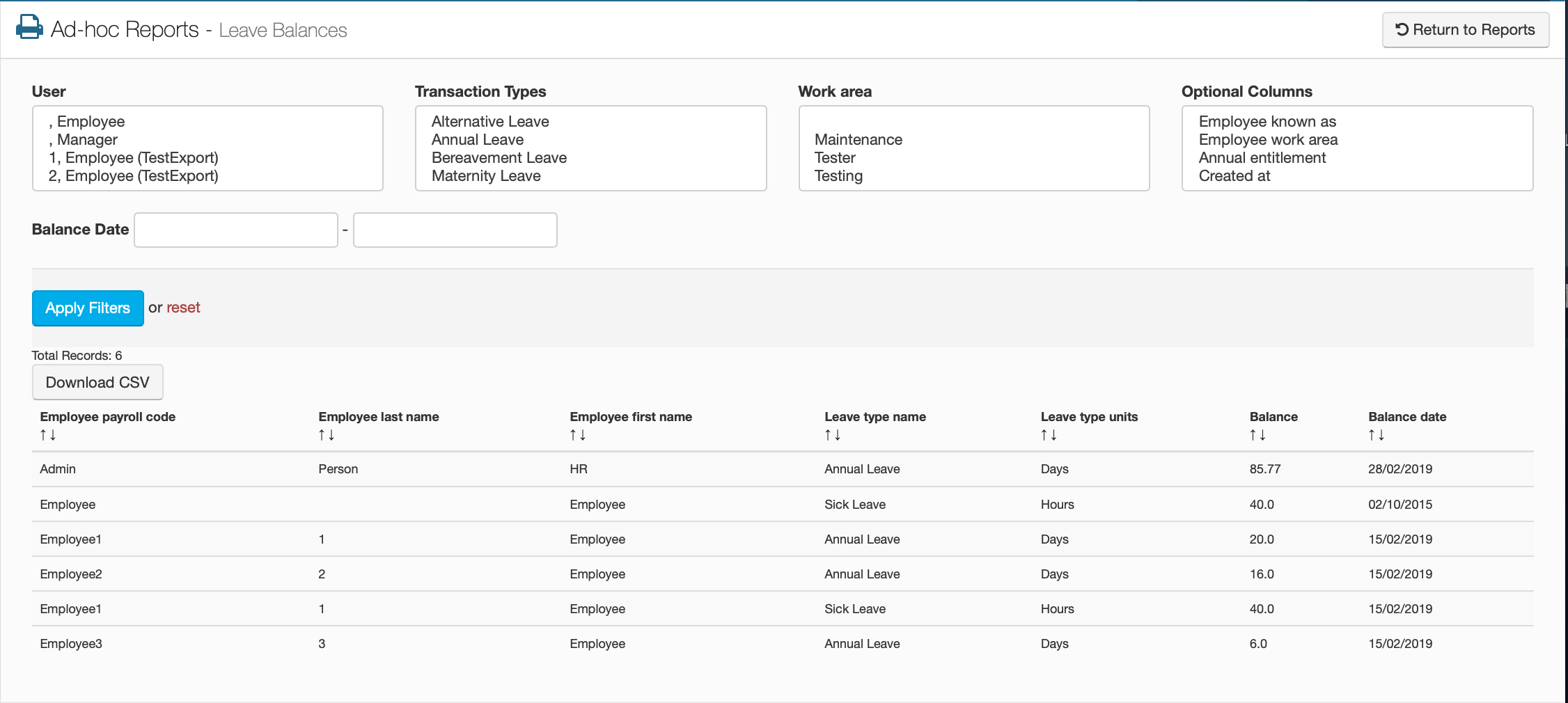
This screen will be split into two parts, the top half will be the filter and the other half will be the table of leave balances for every employee on the portal. This table will list every leave type that all your employees have available as well as how many units of each leave type they have.
The Filter Options
User
This will allow you to select a specific user.
Transaction Types
This will allow you to select a specific transaction type.
Work Area
This will allow you to select a specific work area.
Optional Columns
This will allow you to select additional columns that you want to see on the table.
Balance Date
This will allow you to look for balances within a specific time period.
The Table Options
Employee Payroll Code
This will show you the employee's payroll code.
Employee Last Name
This will show you the employee's last name.
Employee First Name
This will show you the employee's first name.
Leave Type Name
This will show you the name of all leave types.
Leave Type Units
This will show you how each of these leave types are calculated in.
Balance
This will show you how much of each leave type the employee's have.
Balance Date
This will show you when the balance was