
Standard Reports
What are Reports
Reports are a way of checking a variety of information related to the users on the portal. They generate relevant information to which report you are currently running, and are usable by everyone.
How to check Reports
From the dashboard you want to click on the tab on the left called 'Reports'. This will bring you to where you will be able to run statement of earrings reports. Everyone on the portal except for external users will be able to access the standard reports, meaning anyone can view their own statement. The statement of earnings reports will show you leave accruals.

The Statement of Earnings is a report that shows information for the financial year of a single employee that gets sent to IRD. It's a fairly basic setup, input the year that you want the report to show then click generate. This will create the report (and give you the option to send it).
What does everything here mean?
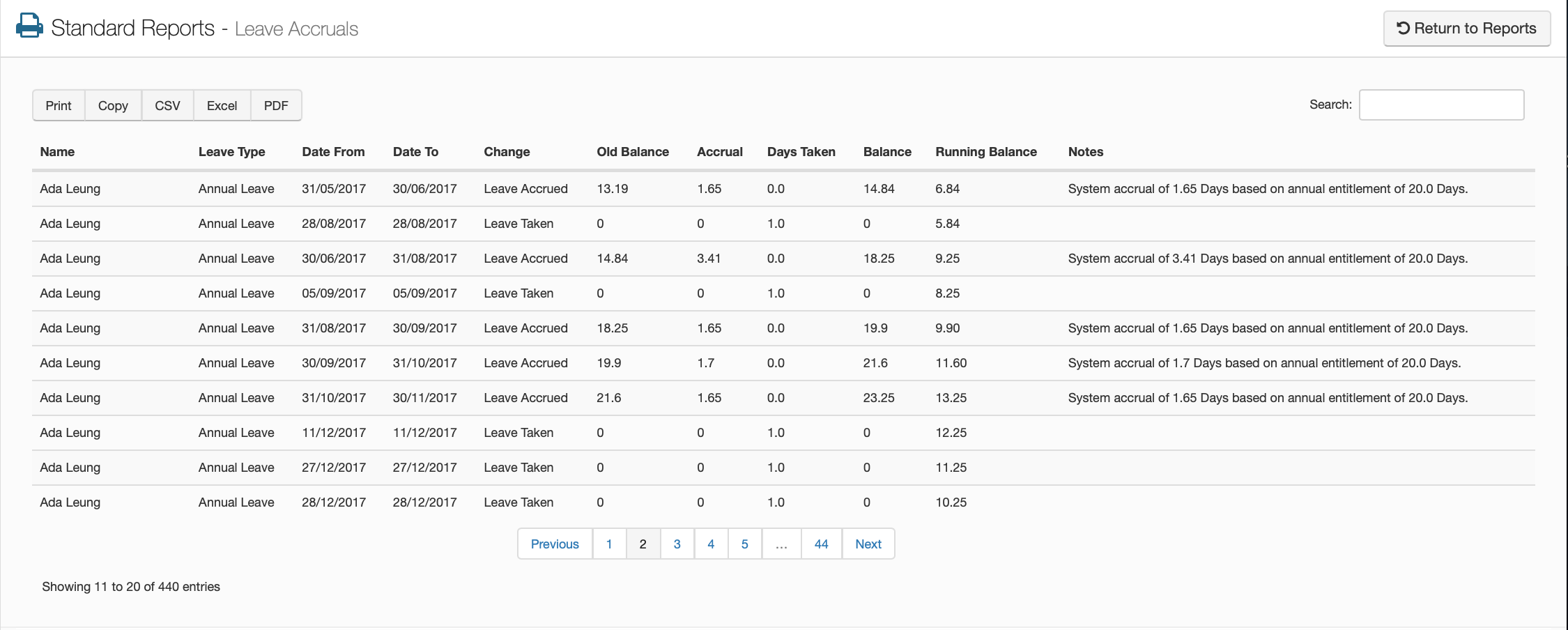
The Leave Accruals screen shows reconciliation of accrued leave against leave taken over time. You will be able to see this for all employees. This also shows any notes about the leave accruals that will be of use. If you need to you can also print this page to a local printer or copy to your clipboard. You can also change the format to a CSV, an Excel sheet or a PDF.
Name
This will show the name of the employee
Leave Type
This will show you which leave type has been requested
Date From / Date To
Shows you the period of time that the leave was taken over
Change
Shows you whether the entry of leave is an accrual or leave taken
Old Balance
This is the balance of that leave type for the employee before the accrual
Accrual
Shows how much leave was accrued for that time
Days Taken
Shows how many days of leave were taken
Balance
This will be the employee current balance of that leave type after the accrual
Running Balance
This shows you the sum of the leave over time, line by line
Notes
If there are any notes added to the leave entry, they will be shown here